Select Version of EA Desktop:
By default, the grids typically display all available columns. The Column Chooser provides the option to specify which columns to display in each grid.
To select the columns to display:
-
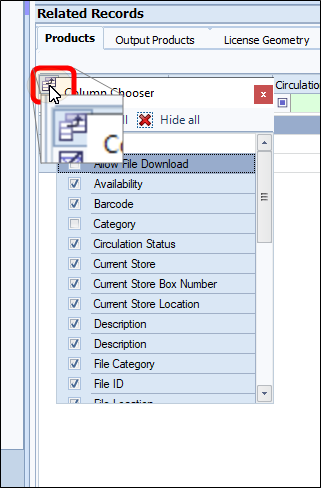
Click the button on the left above the grid to open the Column Chooser.
-
Clear or select the checkbox beside a column heading to show or hide columns.
Alternatively, add a column by dragging it from the Column Chooser to the grid.
-
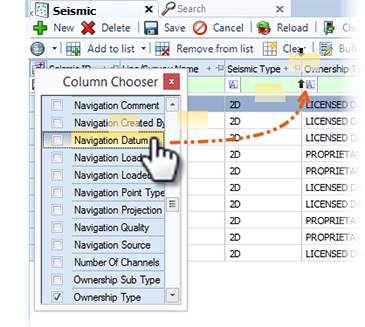
Click and drag the column name from the Column Chooser directly to the a location in the grid. As you drag the column to position, a yellow transparent box displays the movement.
-
Release the column when a pair of arrows display to indicate the placement location.
In the same way, you can remove columns by dragging them from the grid and into the Column Chooser.
-
-
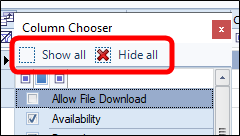
You also have the option to show or hide all the columns by clicking the appropriate boxes
-
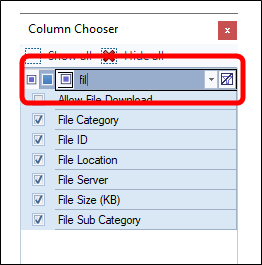
You can filter the column list by typing part of the name in the filter field. The column headings will narrow the list as you type.
By default, the grids typically display all available columns. The Column Chooser provides the option to specify which columns to display in each grid.
To specify the columns to display:
-
Click the button on the left above the grid to open the Column Chooser.
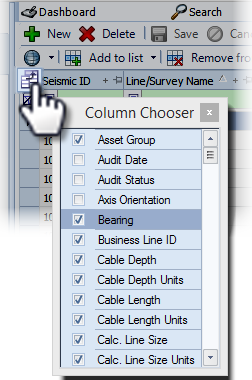
-
Uncheck to hide columns. Check to add columns.
The changes come into effect immediately.Alternatively, add a column by dragging it from the Column Chooser to the grid.
-
Click and drag the column name from the Column Chooser directly to the a location in the grid. As you drag the column to position, a yellow transparent box displays the movement.
-
Release the column when a pair of arrows display to indicate the placement location.
In the same way, you can remove columns by dragging them from the grid and into the Column Chooser. -
To close the Column Chooser, click the red X.
-
Alternatively, add a column by dragging it from the Column Chooser to the grid.